Microsoft Store Certified & Licensed

Download SwiftSnip Client

The certified desktop app engineered for streamers, editors, and community clippers. Instant hotkeys, local rendering, zero latency.

"We are the world's first clipper with certification and licenses listed on the Microsoft Store — the fastest clipper in the market, most accurate, and creator friendly."

Official Microsoft Store App
Get SwiftSnip on Microsoft Store
Or open web store link (Browser) ↗
Verified Microsoft Publisher
•
Windows 10 / 11 Supported
•
Automatic Safe Updates
All-In-One Vertical Shorts Studio

Turn Stream Clips into Viral Shorts — Without Downloading

Stop waiting hours to download 30GB stream files just to edit a 30-second clip. The SwiftSnip Client features a dedicated Vertical Shorts Editor built directly into the app so you can cut, sound-design, caption, and export stream highlights directly to TikTok, YouTube Shorts, & Instagram Reels.

No Download Required

Edit stream moments directly in 9:16 vertical canvas without saving raw VODs locally first.

1,700+ Sound Effects (SFX)

Massive built-in library of meme drops, punchlines, anime swooshes, and hits ready in 1 click.

Library & Local BGM

Pick background music from our library or import your own local audio tracks (.mp3, .wav).

AI Animated Auto-Captions

Generate eye-catching karaoke/word-by-word subtitles automatically with custom styling.

✨

Zero editing experience? Smart presets & auto-split facecam let anyone edit viral shorts in seconds.
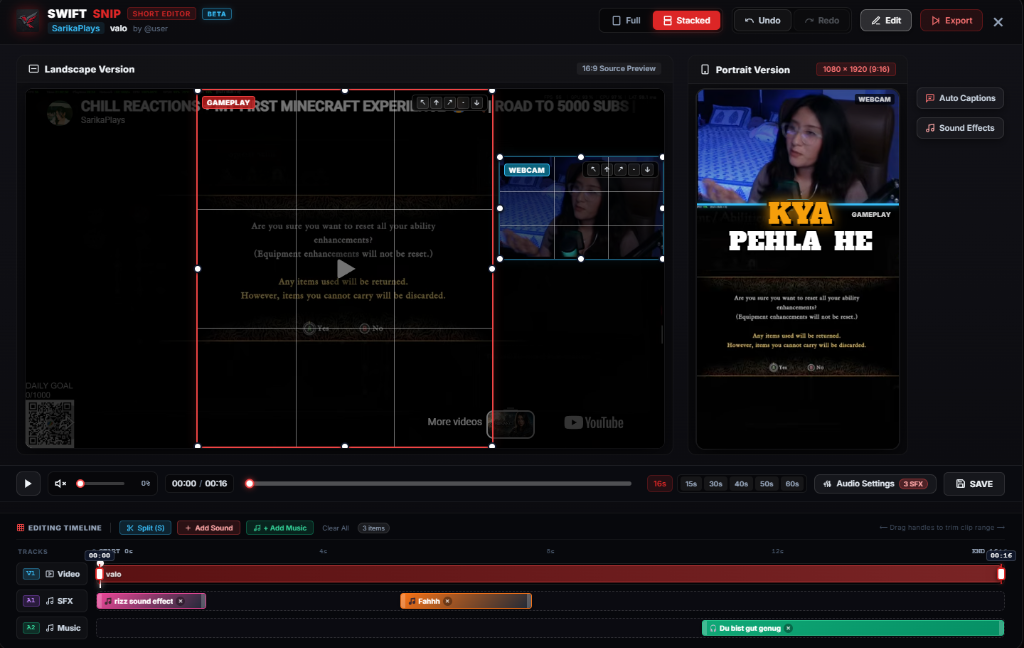
Actual Client UI
SwiftSnip Client Built-in Vertical Short Editor with Timeline, SFX and Captions
16:9 to 9:16 Split & Stack Auto-Captions 1,700+ SFX & BGM Tracks
Real Client Snapshot

Everything You Need to Clip & Create

All the power of the SwiftSnip platform in a fast, lightweight desktop application.

Creator Dashboard

Access your creator profile, stream highlights, leaderboards, and video feeds directly inside the app with seamless navigation.

High-Speed Clip Downloads

Download your favourite clip moments in full HD with accurate start and end timestamps in seconds without downloading entire hours-long streams.

Batch Queue Manager

Select multiple clips from any stream or creator profile and download them automatically in the background while you focus on editing.

Desktop Notifications

Receive clean bottom-right popup alerts with sound chimes when your downloads finish, even when the client is minimized to your system tray.

Editor Review & Spreadsheets

Collaborate with your editing team, update clip review statuses (Approved/Review/Done), and export full spreadsheets to Excel and CSV.

Custom Storage & Themes

Choose your preferred download hard drive or custom folder, customize notifications, and switch between Crimson, Blue, Yellow, and Green themes.

Get Started with SwiftSnip Today

Download the certified client directly from the Microsoft Store for your Windows PC.