01. Why Every Streamer Needs a Dedicated Vertical Editor
Short-form video is currently the #1 discovery engine for live streamers across YouTube, Twitch, and Kick. While live stream viewership often plateaus without external promotion, algorithmic feeds on TikTok, YouTube Shorts, and Instagram Reels expose your funniest moments and clutch plays to millions of non-followers.
However, traditional clipping workflows were painfully broken:
- Waiting hours for YouTube or Twitch VODs to finish processing after a stream ends.
- Downloading 20GB to 50GB video files onto full hard drives.
- Opening heavy editing software like Premiere or DaVinci just to cut 30 seconds and crop a 9:16 box.
- Manually masking facecams, aligning timelines, and typing subtitles frame by frame.
The SwiftSnip Vertical Shorts Editor was engineered from the ground up to solve this exact pain point by placing professional short-form production directly inside the certified SwiftSnip desktop app.
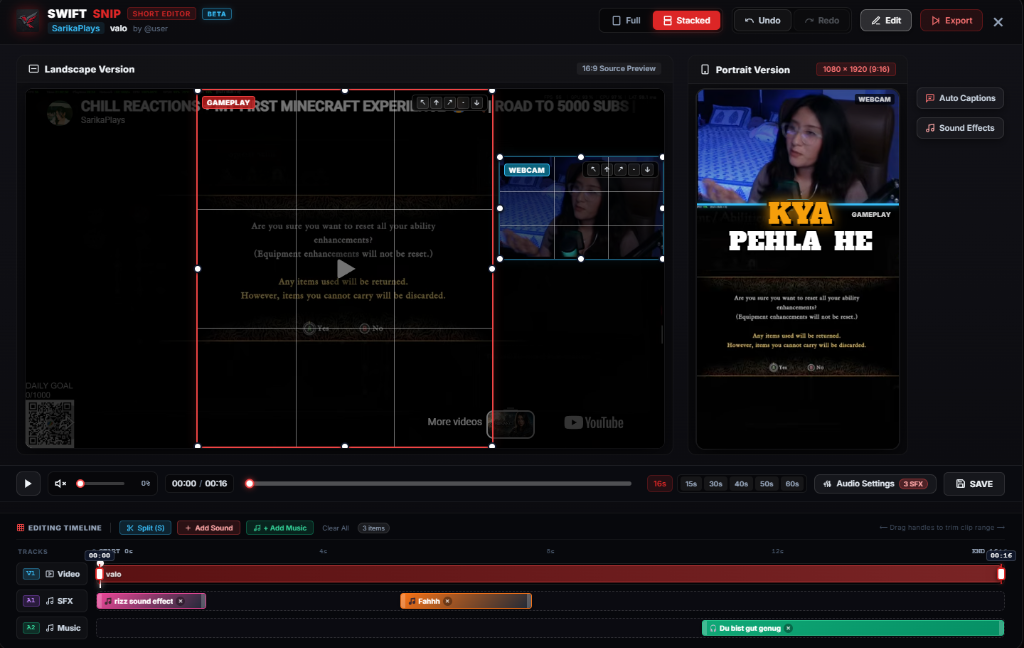
02. Key Features & Technical Capabilities
Zero-Download Workflow
Edit stream clips directly without saving massive raw VODs to your local disk. Load stream timestamps bookmarked by your viewers via !clip instantly.
Smart Facecam Split Layouts
Effortlessly split your canvas into a top facecam reaction window and a bottom gameplay focus, or choose blurred aesthetic background pillars with 1 click.
AI Karaoke Auto-Captions
Auto-generate synchronized, word-by-word animated subtitles with custom color fills, stroke borders, and emoji accents to hook viewers scrolling on mute.
1,700+ Built-in SFX & BGM
Access a massive integrated soundboard of meme audio, anime whooshes, bass drops, and comedy stings. Drop royalty-free background tracks directly into the timeline.
Direct Chat Command Sync
Every highlight bookmarked during your live broadcast using Nightbot, StreamElements, or Botrix syncs instantly to your local editor queue.
Hardware GPU Acceleration
Renders crystal-clear 1080x1920 60FPS vertical MP4s utilizing NVENC, AMD AMF, and Intel QuickSync. Zero CPU bogging and no watermarks whatsoever.
03. How SwiftSnip Compares to Traditional Editors
Streamers often struggle between complex desktop software like Adobe Premiere and mobile phone apps like CapCut. Here is how SwiftSnip's native client bridges the gap:
| Feature | SwiftSnip Vertical Editor | Premiere / DaVinci | CapCut / Mobile Apps |
|---|---|---|---|
| VOD Download Required | ❌ No (Direct cloud/buffer sync) | ✔️ Yes (30GB+ VODs) | ✔️ Yes (Transfer to phone) |
| Facecam / Gameplay Split | 1-Click Smart Preset | Manual cropping & nesting | Manual overlay drag |
| Built-in Meme SFX Library | 1,700+ sounds included | Manual download/organize | Limited soundboard |
| Live Chat !clip Sync | Native instant integration | None (Manual timestamp scrubbing) | None |
| Watermark Free | 100% Watermark-Free | Watermark-Free (Paid sub) | Branded outro / Pro paywalls |
| Licensing & Safety | Microsoft Store Certified | Adobe / Blackmagic | ByteDance |
04. From Live Stream to TikTok in 3 Simple Steps
Bookmark While Streaming with !clip
When something hilarious or clutch happens on your stream, you or any viewer types !clip in chat. SwiftSnip locks in the exact 40-second timeline window with no stream lag.
Open the SwiftSnip Vertical Shorts Studio
Launch the client. Your clipped moment is already queued up. Apply the Facecam Split preset, toggle AI Auto-Captions, and pick a meme punchline sound effect from the built-in library.
Export 1080x1920 60FPS in 1 Click
Hit Export. GPU hardware acceleration generates a crisp vertical video in seconds, completely watermark-free and formatted for immediate upload to YouTube Shorts, TikTok, and Instagram Reels.